ERP for Construction and Project-Based Businesses: Job Costing Made Simple
See how ERP for construction and project-based businesses connects budgets, purchase orders, subcontractor billing and timesheets so job costing stops living in spreadsheets and starts living in real time.
What's Inside
- 01What Is ERP for Construction and Project-Based Businesses?
- 02Why Spreadsheets Break Down on Project Work
- 03Job Costing Fundamentals Explained
- 04Budgeting, Cost Codes and Change Orders
- 05Procurement, Subcontractors and Vendor Billing
- 06Project Scheduling and Resource Planning
- 07Spreadsheets vs ERP Job Costing
- 08ERP Options for Construction and Project Businesses
- 09How to Choose the Right Platform
- 10Implementation Checklist
- 11Conclusion
- 12Frequently Asked Questions
Construction, engineering, interior fit-out and other project-based businesses run on contracts, not standard products. Every job has its own budget, its own timeline, its own subcontractors and its own margin. That makes basic accounting software a poor fit once a company is running more than a handful of active sites at once. This is exactly the gap ERP for construction and project-based businesses is built to close.
Many project businesses start with spreadsheets, WhatsApp updates from site engineers and a standalone accounting tool. It works when there are two or three jobs running. It becomes risky once there are ten, twenty, or projects spread across multiple cities, because nobody has one current view of what a job has actually cost so far — and without ERP for construction and project-based businesses in place, that gap only widens as project count grows.
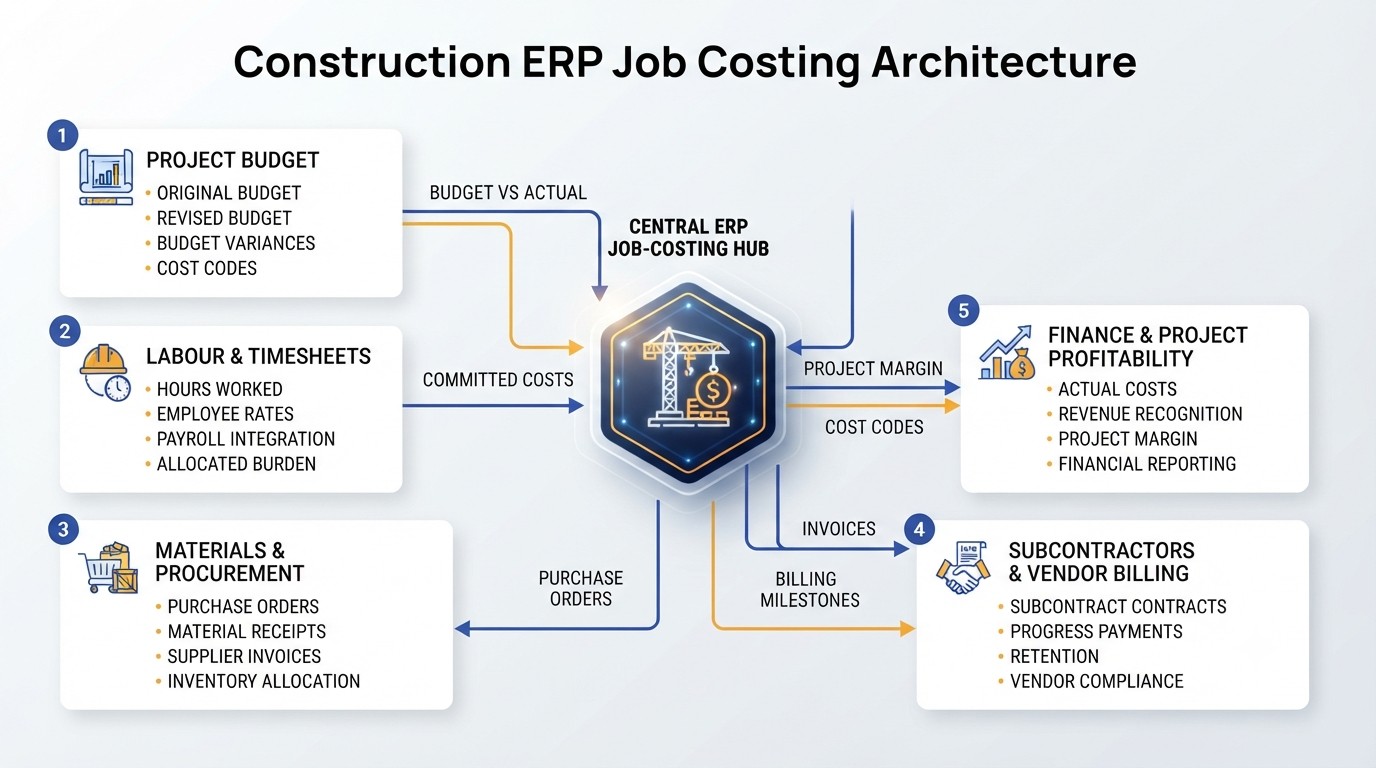
ERP for construction and project-based businesses exists to close that gap — connecting budgets, purchase orders, site expenses, subcontractor invoices and timesheets into one job-costing record that updates as the work happens, not weeks after project close.
What Is ERP for Construction and Project-Based Businesses?
ERP for construction and project-based businesses is a business management platform built around the "project" or "job" as the central unit of tracking, instead of the product or the branch. Every cost, every invoice and every hour logged is tied back to a project code, a task and a cost category.
This differs from standard enterprise resource planning (ERP) built for manufacturing or retail, where inventory and sales orders are the primary transactions. In project-based ERP, the primary transaction is the job: its contract value, its budget, its schedule, and every cost incurred against it from the day it is won to the day it is closed out. In short, ERP for construction and project-based businesses reorganises accounting and operations data around the job rather than around the calendar month.
Why Spreadsheets Break Down on Project Work
Spreadsheets and disconnected accounting tools work for a while because a small team can hold the details in their heads. That stops being true once project count, site locations and subcontractor relationships grow — which is precisely when ERP for construction and project-based businesses starts to pay for itself.
- Site expenses are recorded days or weeks after they occur.
- Budget versus actual cost is reconciled manually, once a month, if at all.
- Subcontractor bills arrive faster than anyone can match them to work completed.
- Change orders are agreed verbally on site and never reflected in the budget.
- Labour hours are tracked on paper registers, then re-entered into payroll.
- Head office has no live visibility into which projects are losing margin.
- Retention, advances and milestone billing are tracked in separate files.
None of these problems are caused by a lack of effort from site or accounts teams. They are caused by a process architecture where information about the same job lives in five different places that never talk to each other. ERP for construction and project-based businesses exists specifically to close that information gap.
Job Costing Fundamentals Explained
Job costing is the practice of assigning every cost — labour, materials, equipment, subcontracting and overhead — to the specific project it belongs to, usually broken down further by cost code or work package. This is what separates project accounting from general company accounting, and this level of tracking is exactly what ERP for construction and project-based businesses is designed to automate.
01Direct Costs
Materials, labour and subcontractor charges that can be traced directly to one project and one cost code.
02Committed Costs
Purchase orders and subcontract agreements that have been issued but not yet invoiced — a job can look fine on paper until commitments are counted.
03Overhead Allocation
Site supervision, equipment depreciation and shared resources allocated across active projects on a consistent basis.
04Revenue Recognition
Billing milestones, percentage-of-completion and retention that determine what revenue can be recognised at a given point.
Good ERP for construction and project-based businesses should let a project manager see budgeted cost, committed cost, actual cost and remaining cost for every cost code, at any point during the project — not only at month end. This mirrors the cost management discipline defined by the Project Management Institute, applied at the level of an individual job rather than a single enterprise-wide budget.
Budgeting, Cost Codes and Change Orders
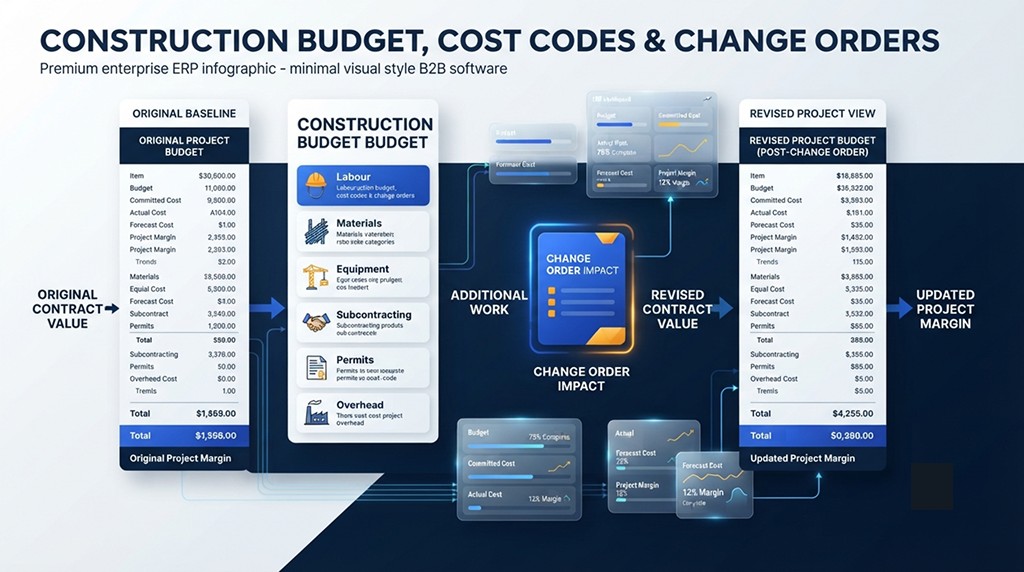
Every project needs a baseline budget broken into cost codes — labour, materials, equipment, subcontracting, permits and overhead are typical categories. That baseline is the reference point every subsequent cost gets measured against, and ERP for construction and project-based businesses keeps that baseline locked while still allowing controlled revisions.
Change orders are where many project businesses lose margin quietly. A client requests additional work, the site team agrees informally, the work happens, and the additional cost only surfaces at final billing — often without a matching increase in contract value.
- Every change order recorded as a distinct line against the original budget.
- Client approval status tracked before extra cost is committed where possible.
- Revised contract value and revised margin visible side by side with the baseline.
- Cost-code level detail so overruns can be traced to a specific category, not just the whole job.
Handled through ERP for construction and project-based businesses, this tracking happens automatically instead of during a stressful month-end reconciliation.
Procurement, Subcontractors and Vendor Billing
Materials and subcontracted work typically make up the largest share of project cost. In ERP for construction and project-based businesses, procurement should tie every purchase order and subcontract agreement to a project and cost code from the moment it is raised, not only when the invoice arrives.
Subcontractor billing has its own complexity: work completion certificates, retention percentages, advance recovery and milestone-based payments all need to reconcile against the subcontract value without manual spreadsheet tracking. Bodies such as the Construction Financial Management Association publish detailed guidance on exactly this kind of retention and billing discipline.
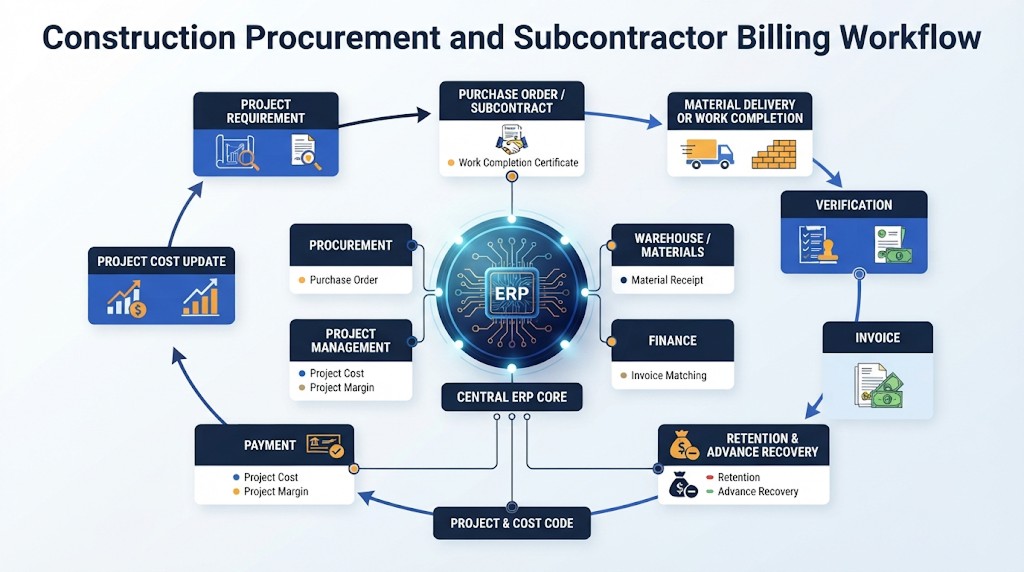
- Purchase orders and subcontracts linked to project and cost code.
- Three-way matching between order, delivery or work completion, and invoice.
- Retention held and released automatically against agreed terms.
- Vendor and subcontractor performance visible across projects, not just one job.
Project Scheduling and Resource Planning
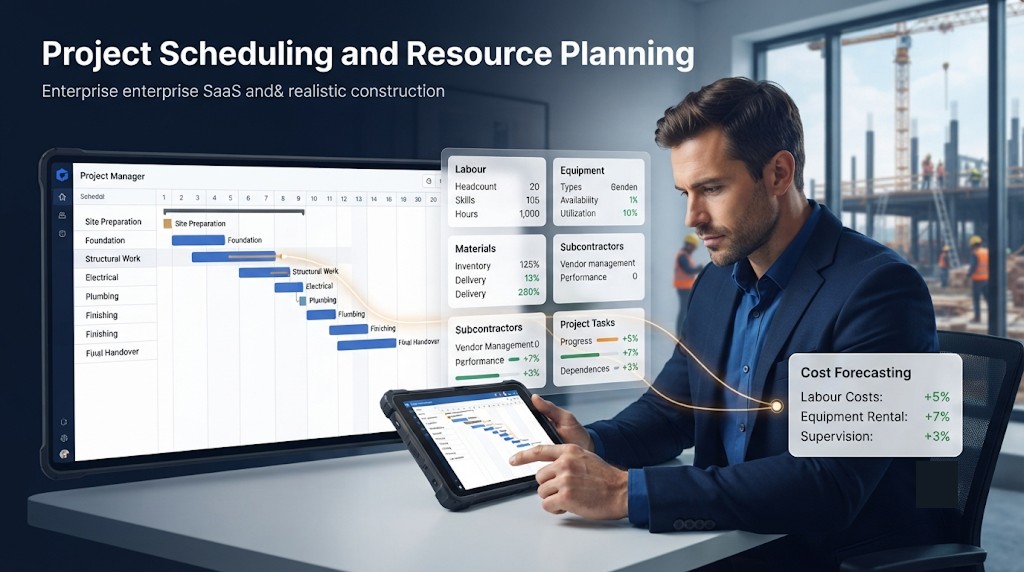
Cost control and schedule control are connected. A delayed task usually means extended equipment rental, extended site supervision and sometimes penalty clauses. An ERP with project scheduling should let planners see task dependencies, resource allocation and how a schedule slip affects the cost forecast.
If your team is still coordinating site schedules through spreadsheets and phone calls, see our related guide on ERP vs Excel for Manufacturing for the same underlying argument applied to project environments.
Spreadsheets vs ERP Job Costing
| Area | Spreadsheets & Disconnected Tools | ERP-Based Job Costing |
|---|---|---|
| Cost visibility | Updated manually, often weeks late | Updated as purchase orders, invoices and timesheets are recorded |
| Budget vs actual | Reconciled at month end or project close | Available in real time by cost code and project |
| Change orders | Tracked informally or missed entirely | Logged against the baseline with revised margin visible |
| Subcontractor billing | Matched manually against contracts | Matched to work completion, retention and milestones |
| Multi-project visibility | Each job in a separate file | Consolidated dashboard across all active projects |
| Margin forecasting | Reactive, discovered after the fact | Forward-looking, based on committed plus actual cost |
This is a comparison of process architecture, not a claim that spreadsheets are unusable. Many businesses run well on spreadsheets at a small scale. The comparison becomes meaningful once project count and subcontractor complexity grow — which is the core value proposition of ERP for construction and project-based businesses: architecture, not effort.
ERP Options for Construction and Project-Based Businesses
There is no single best platform for every project business. The right choice depends on project volume, contract types, subcontractor complexity, budget and existing systems. Choosing ERP for construction and project-based businesses starts with matching platform capability to how complex your contracts and subcontractor base already are.
Microsoft Dynamics 365 Business Central
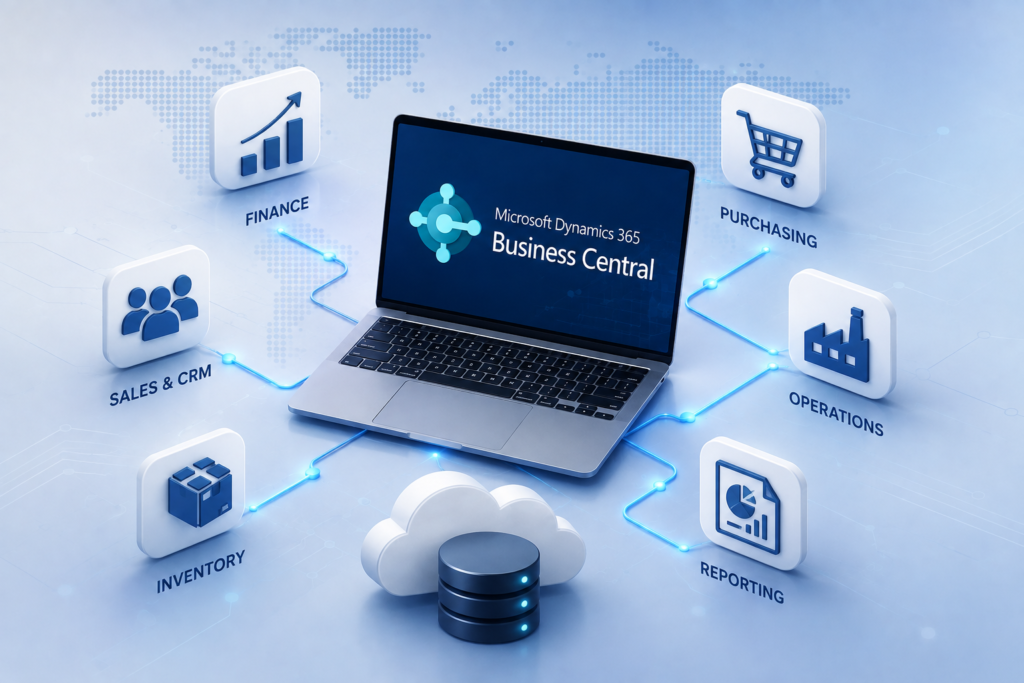
Worth evaluating for growing project businesses that need job costing, purchasing, finance and reporting in one connected ERP environment.
SAP Business One
Worth considering when a mid-market project or engineering business wants an established ERP platform with strong financial controls.
ERPNext
An open-source option worth evaluating when project accounting needs to be customised closely to Indian compliance and billing practices.
Odoo
A modular ERP platform to consider when project costing needs to connect with procurement, inventory, timesheets and CRM in one system.
Custom ERP
Worth exploring when contract structures, milestone billing or retention rules are specific enough that off-the-shelf project modules don't fit cleanly.
Innoverse E-Invoicing
Useful alongside any of the above to keep GST e-invoicing and e-way bill compliance automated as project billing volume grows.
Innoverse 360 works across Microsoft Dynamics 365, SAP, ERPNext, Odoo and custom ERP solutions, so project businesses can compare platform fit against their actual contract and billing structures rather than a generic feature list.
How to Choose the Right Platform
Start by mapping how a project moves today — from quotation and contract, through budgeting, procurement, execution, billing and close-out. Identify where information currently breaks or gets re-entered. Working through each of these steps before shortlisting vendors makes selecting ERP for construction and project-based businesses far more accurate.
Define contract and billing types
Fixed price, cost-plus, milestone billing and time-and-material contracts each need different job-costing and invoicing logic.
Document cost-code structure
List the cost categories you need to track — labour, materials, equipment, subcontracting, overhead — and how granular reporting must be.
Map subcontractor and vendor workflows
Include retention terms, advance recovery, work-completion certificates and approval hierarchies.
Review compliance requirements
Include GST, e-invoicing through the official GST e-invoice portal, TDS on contracts, and any state-specific labour or works-contract rules relevant to your projects.
Evaluate reporting needs
Identify what head office, project managers and finance each need to see, and at what frequency.
Construction ERP Implementation Checklist
Choosing a platform is only the first step. A controlled implementation plan keeps project data, budgets and vendor records accurate from day one — this is where most ERP for construction and project-based businesses rollouts succeed or stall.
Before Go-Live
Standardise project codes, cost codes, customer and subcontractor records before migration.
Bring in current budgets, committed purchase orders and costs incurred to date for every live job.
Set up milestone billing, retention percentages and advance recovery to match actual contract terms.
Confirm compliance workflows are configured for contract billing, not only standard sales invoices.
Run a pilot project through the full cycle — budget, procurement, billing, reporting — before wider rollout.
Site engineers, procurement, accounts and project managers each need training focused on their part of the workflow.
Implementation cost should be separated into licensing, implementation services, data migration, integrations, customisation, training and ongoing support. See our related guide on ERP implementation cost in India.
Conclusion
ERP for construction and project-based businesses becomes worth adopting once job count, subcontractor complexity and billing structures have outgrown what spreadsheets and standalone accounting can reliably track. The goal isn't more dashboards for their own sake — it's one accurate, current answer to how each project is actually performing against its budget.
Job costing done well means budget, committed cost, actual cost and margin are visible by project and cost code at any point in the job, not reconstructed after the fact. That is the difference between managing a project and reacting to one once it's already over budget.
For the next step, explore the Innoverse 360 ERP blog, or talk with an ERP transformation team about your current project and billing structure.