ERP Implementation Checklist: 15 Steps Before You Go Live
Most ERP projects do not fail because of the software. They fail because of missed preparation. This ERP implementation checklist walks you through 15 practical steps so your team launches on time and on budget.
Why You Need an ERP Implementation Checklist
An ERP touches every department, from sales and purchase to production, stores, and accounts. One missed task, such as unclean data or untrained users, can delay the launch by months. An ERP implementation checklist turns a large, risky project into small tasks with owners, dates, and clear sign-offs.
Whether you run a manufacturing unit, a trading business, or a service company, the same ERP implementation checklist applies. Follow the 15 steps below in order, and assign each one to a named person before the project starts.
The 15 Steps in Your ERP Implementation Checklist
Define Business Goals and Scope
Every ERP implementation checklist starts with one question: what must change after go-live? Write down measurable goals such as faster month-end closing, fewer stock errors, or one live view of sales. Then fix the scope by listing the modules, branches, plants, and users included. A tight scope protects your budget and timeline, and it gives every later decision a clear reference point.
Form the Project Team
Name an executive sponsor, a full-time project manager, and process owners from finance, sales, purchase, inventory, and production. Add an IT lead and a data owner. Projects fail when the ERP is treated as an IT task, so give business leaders real authority and protect their time during the project.
Map Your Current Processes
Document how orders, purchases, approvals, and payments actually move today, not how the manual says they should. Walk the floor and talk to the people doing the work. This map reveals duplicate steps, spreadsheet workarounds, and hidden approvals that the new system must either handle or remove.
Gather and Rank Requirements
Turn your process map into a requirements list and label each item as must-have, should-have, or nice-to-have. This ranking keeps your ERP implementation checklist practical and stops scope creep. Avoid heavy customization wherever a standard feature already solves the problem, because custom code makes upgrades slower and support costlier.
Set the Budget and Timeline
Budget for licences, implementation services, data migration, integrations, training, and support, then add a contingency of ten to fifteen percent. Build a timeline with milestones and sign-off dates. Realistic planning beats optimistic promises, and unclear budgets are one of the main reasons projects stall halfway.
Choose the Right ERP and Partner
Shortlist products against your ranked requirements and ask for demos using your own business scenarios. Check industry experience, local support, and customer references. The partner matters as much as the software. Working with the best digital transformation company in india means getting people who have delivered real go-lives, not only licence sales.
Clean and Prepare Your Data
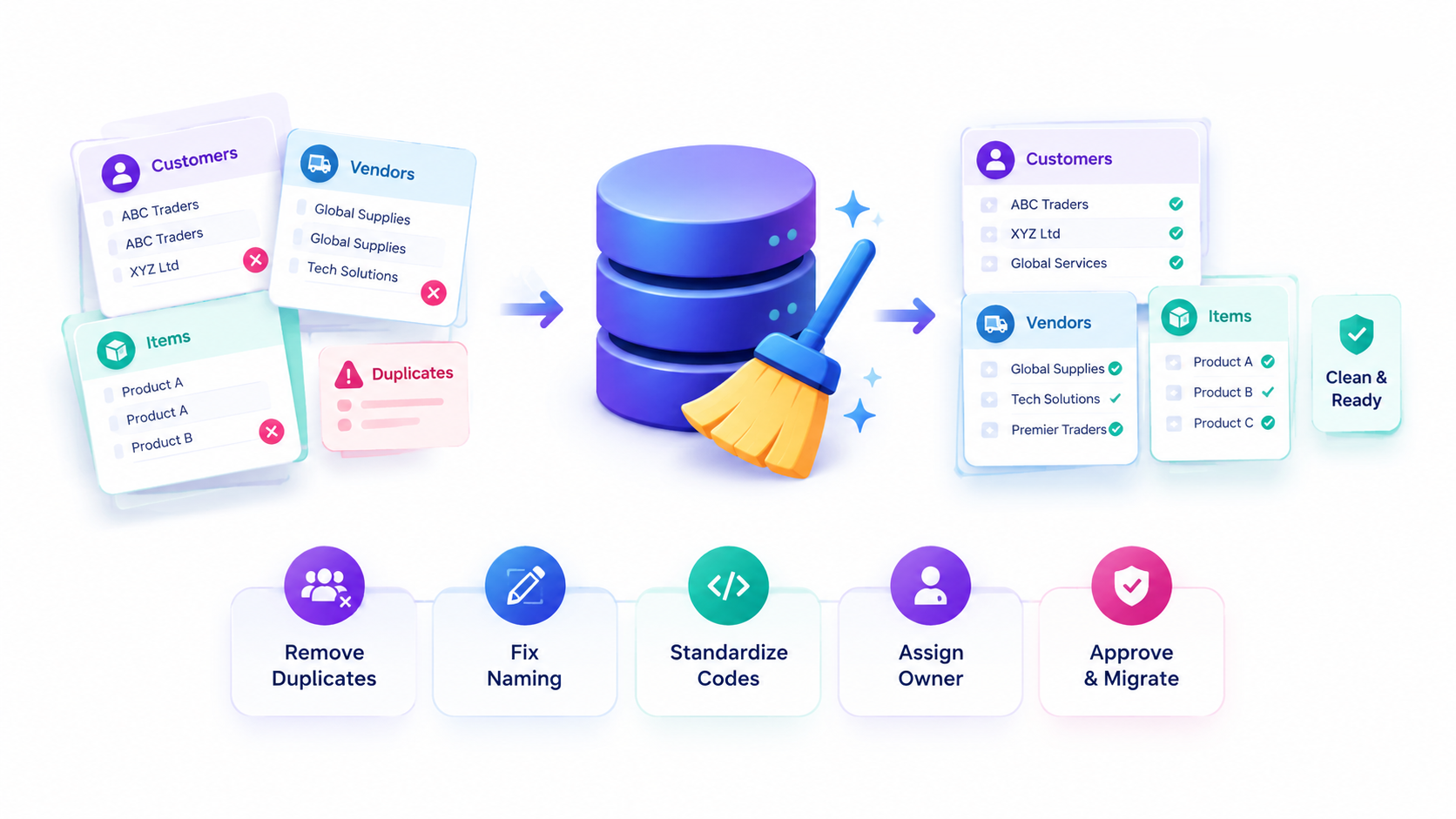
Bad data quietly kills ERP projects. Remove duplicate customers, vendors, and items, fix naming, and agree on codes for units, taxes, and categories. Assign an owner to every data set and approve the cleaned files before migration begins. A serious ERP implementation checklist places data cleanup early because it always takes longer than expected.
Configure and Design the System
Set up the chart of accounts, workflows, user roles, approval limits, and document formats in a test environment. Run design workshops with process owners and record every decision. Make configuration over customization your rule, because standard setups upgrade easily and cost less to maintain.
Plan Your Integrations
List every system the ERP must talk to: payment gateways, CRM, e-commerce, biometric devices, banking, and GST or e-invoicing portals. Define what data moves, in which direction, and how often. Test each integration on its own before combining them in full end-to-end tests.
Migrate Data in Trial Runs
Run at least two trial migrations before the real one. After each run, compare record counts, opening balances, and stock quantities against source reports. Finance must sign off on balances. Trial runs expose mapping errors while fixing them is still cheap and nobody is waiting on the system.
Test Thoroughly
Test in layers: unit tests for each feature, integration tests across modules, and user acceptance testing with real scenarios from daily work. Log every defect with an owner and a deadline. Do not move forward until critical issues are closed, because go-live pressure is the worst time to discover them.
Train Your Users
Train people by role, in short sessions, using your own data and processes. Create quick reference guides and nominate a super-user in each department who can help colleagues. Training given one week before go-live is forgotten fast, so schedule refreshers and a hands-on practice week instead.
Manage Change and Communication
People resist what they do not understand. Explain why the ERP is coming, what changes for each role, and when. Share progress updates, collect concerns, and answer them openly. A strong ERP implementation checklist treats communication as a task with owners and dates, not as a nice extra.
Prepare the Go-Live Plan
Choose a date away from year-end, audits, and festival peaks. Prepare an hour-by-hour cut-over schedule, a rollback plan, a freeze on old-system entries, and a support roster. Hold a final readiness meeting where every team lead confirms that each ERP implementation checklist item is complete.
Support, Monitor, and Improve
Go-live is the start of adoption, not the end. Keep consultants available for the first weeks, track support tickets, and review key reports daily. Compare results with the goals you set in step one, then plan phase two improvements. Finishing the post-launch period is what delivers the return on investment.
Common Mistakes This ERP Implementation Checklist Helps You Avoid
Companies often skip data cleanup, over-customize the software, or train staff too late. Others pick a partner on price alone, or go live during a busy month. Each mistake is covered by a step above, which is why a written ERP implementation checklist is cheaper than fixing problems after launch.
Another common issue is unclear ownership. When nobody owns a task, it silently slips. Review your ERP implementation checklist weekly in a short project meeting and mark every item as done, at risk, or blocked.
How Long Does an ERP Implementation Take?
Small businesses with standard processes can often launch in three to four months. Mid-sized companies with several branches, manufacturing, or heavy integrations usually need six to twelve months. The timeline depends less on the software and more on data quality, user availability, and how quickly decisions are made.
Use your ERP implementation checklist to track progress honestly. If steps one to five are rushed, the later steps will take twice as long. Spending an extra two weeks on planning almost always saves two months during testing and migration.
Final Readiness Questions Before Go-Live
One week before launch, ask your team these questions. Have all critical defects been closed and retested? Do opening balances and stock quantities match the old system? Has every user completed role-based training and received a login? Is there a written rollback plan, and does everyone know who makes the final go or no-go call?
Also confirm that support is ready. Your vendor, internal super-users, and IT lead should share a single contact sheet, and a daily check-in should run for the first two weeks. If any answer is no, delay the launch. A short delay is far cheaper than a failed go-live that damages customer trust and team confidence.
Measuring Success After Launch
Return to the goals from step one and measure them thirty, sixty, and ninety days after go-live. Track month-end closing time, order-to-delivery time, stock accuracy, purchase cycle time, and the number of manual spreadsheets still in use. Share results openly so the team sees the benefit of the change.
Finally, keep improving. Collect user feedback, fix pain points, and add new modules in planned phases. A living ERP implementation checklist, updated after every project phase, becomes a reusable playbook for future branches, acquisitions, and upgrades.
Keep one shared tracker for the whole team, with columns for task, owner, due date, and status. Review it every week, and escalate blocked items to the executive sponsor within two days. Simple habits like this keep the project visible, honest, and moving toward a calm launch day.
Choose an Experienced Partner
A checklist is only as strong as the team executing it. Innoverse 360 is a Chennai-based ERP and digital transformation firm that helps Indian businesses plan, configure, migrate, and launch ERP systems with confidence. Many clients call Innoverse 360 the best digital transformation company in india for ERP projects because the team stays involved long after go-live.
If you want the best digital transformation company in india to review your plan, share your ERP implementation checklist with us. We will highlight gaps, risks, and quick wins before you commit budget. Choosing the best digital transformation company in india early saves months of rework and protects your investment.
Ready to Go Live with Confidence?
Talk to our ERP experts today and get a free review of your ERP implementation checklist. Call, WhatsApp, or visit our website now.
Work with the best digital transformation company in india for a smooth, on-time launch.