How to Reduce Inventory Costs With ERP: 7 Proven Ways
Learn how ERP software helps businesses control inventory, reduce excess stock, improve purchasing, optimize warehouse operations, and make better inventory decisions.
Inventory is one of the most important assets for many businesses. At the same time, it can become one of the biggest sources of unnecessary cost when stock levels are not properly controlled.
Excess inventory can increase warehouse expenses, storage requirements, insurance costs, handling costs and working capital requirements. On the other hand, insufficient inventory can result in stockouts, delayed production, missed sales opportunities and dissatisfied customers.
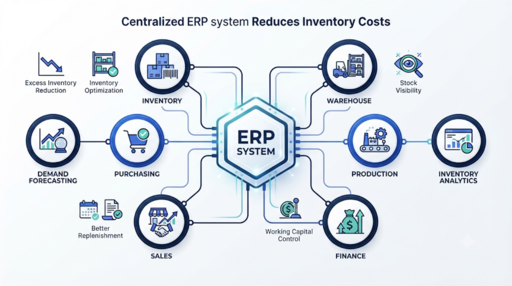
An ERP system can help businesses achieve this balance by connecting purchasing, sales, production, warehouse operations, finance and inventory information in one centralized system.
What Are Inventory Costs?
Inventory costs include more than the amount a business pays to purchase products or raw materials. Businesses also incur costs for storing, handling, financing, insuring and managing inventory.
Understanding these costs is important because inventory optimization is not about reducing stock blindly. It is about understanding where inventory is creating unnecessary financial and operational pressure.
01 Holding Costs
Warehouse space, insurance, handling, utilities and capital tied up in inventory can increase the cost of carrying stock.
02 Stockout Costs
Running out of required materials or finished products can cause production delays, lost sales and customer service problems.
03 Obsolescence Costs
Products that remain unused for long periods may become outdated, damaged or difficult to sell.
04 Ordering Costs
Repeated manual purchasing activities, unnecessary orders and inefficient procurement processes can also increase inventory-related expenses.
How to Reduce Inventory Costs With ERP: Key Strategies
ERP software brings inventory-related information into a connected business environment. Instead of maintaining separate spreadsheets for purchasing, sales, warehouse operations and production, teams can work with centralized information.
This creates better visibility into inventory levels, product movement, purchasing requirements, customer demand and production requirements.
Centralized Inventory Information
ERP provides a common system for tracking inventory receipts, issues, transfers, adjustments and stock availability.
Better Purchasing Decisions
Purchasing teams can use demand, inventory and replenishment information to avoid unnecessary purchases.
Improved Warehouse Control
Businesses can monitor stock movement across warehouses and storage locations more effectively.
Better Inventory Reporting
ERP dashboards and reports can help managers identify excess, slow-moving and fast-moving inventory.
How to Reduce Inventory Costs With ERP Through Better Forecasting
Poor demand forecasting can lead to both excess inventory and stockouts. Businesses may purchase too much stock when demand is overestimated or run out of products when demand is underestimated.
ERP software can bring together historical sales data, current orders, inventory levels, purchasing information and production requirements.
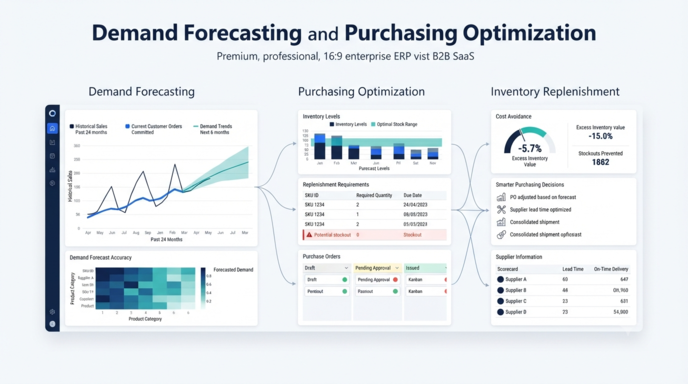
With this information, businesses can make more informed decisions about expected demand and inventory requirements.
Better Forecasting Can Help Businesses:
- Identify demand patterns.
- Plan replenishment more effectively.
- Reduce unnecessary purchasing.
- Prepare for seasonal demand.
- Reduce the risk of stockouts.
Reduce Excess Inventory With ERP
Excess inventory ties up working capital and increases storage and handling costs. If products remain unused for long periods, they can also become obsolete or damaged.
ERP helps businesses monitor inventory quantities and movement so managers can identify products that are being held in larger quantities than required.
By reviewing inventory trends and demand information, businesses can improve replenishment decisions and avoid continuously accumulating excess stock.
Optimize Purchasing With ERP
Purchasing has a direct impact on inventory costs. Ordering materials too early, ordering too much or purchasing without considering existing inventory can create unnecessary stock.
ERP connects purchasing with inventory, sales and production requirements. This gives purchasing teams better information when deciding what to order and when to order it.
ERP Can Help Purchasing Teams:
- Monitor current inventory levels.
- Track open purchase orders.
- Review supplier information.
- Identify replenishment requirements.
- Connect purchasing with production demand.
- Monitor incoming inventory.
Improve Warehouse Management With ERP
Warehouse inefficiency can increase inventory costs through inaccurate stock records, unnecessary movement, poor space utilization and difficulty locating products.
An ERP system can provide centralized visibility into warehouse inventory and stock movements.
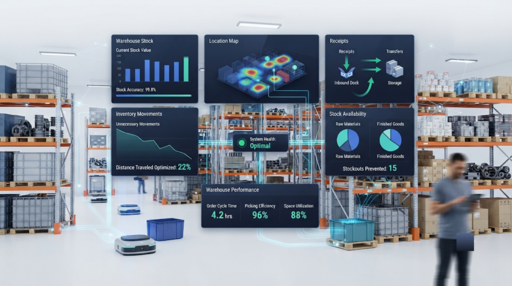
Track Receipts
Record incoming materials and products accurately when they are received.
Track Transfers
Monitor inventory movement between warehouses, locations and storage areas.
Track Issues and Consumption
Maintain accurate information about inventory consumed by production or issued for sales and other business processes.
Improve Stock Accuracy
Centralized transactions can help reduce discrepancies between physical inventory and system records.
Improve Real-Time Inventory Visibility
One of the biggest inventory management challenges is working with outdated or inconsistent information.
For example, the sales team may see inventory as available while warehouse staff know that the same stock has already been allocated to another customer order.
ERP reduces this type of information gap by connecting inventory transactions across departments.
| Without Connected ERP | With ERP |
|---|---|
| Separate inventory spreadsheets | Centralized inventory information |
| Manual stock updates | Connected inventory transactions |
| Difficult stock visibility | Better inventory visibility |
| Delayed purchasing decisions | Faster replenishment decisions |
| Difficult inventory analysis | ERP reports and dashboards |
Improve Inventory Turnover With ERP
Inventory turnover shows how efficiently a business moves and replaces its inventory. Slow-moving stock can indicate that capital is being tied up in products that are not generating sufficient business value.
ERP reporting can help businesses identify fast-moving, slow-moving and aging inventory.
A Fast-Moving Inventory
These products require reliable replenishment planning so that demand can be met without unnecessary stockouts.
B Slow-Moving Inventory
These products should be reviewed regularly to understand why demand is low and whether future purchasing should be adjusted.
C Dead Stock
Products with little or no movement can create unnecessary storage costs and tie up working capital.
Reduce Dead Stock and Slow-Moving Inventory
Dead stock is inventory that has little or no current demand. Keeping this inventory in storage can increase carrying costs without providing sufficient business value.
ERP reporting can help businesses identify items that have not moved for a specific period.
Management can then review whether these products should be discounted, bundled, returned where possible, discontinued from future purchasing or managed through a different sales strategy.
Connect Inventory With Sales and Production
Inventory should not be managed separately from sales and production. Customer orders can create production demand, while production requirements can create material requirements.
ERP connects these processes so departments can work with shared business information.
Sales
Customer orders provide information about products, quantities and required delivery dates.
Production
Production planning can use demand information to determine material requirements.
Purchasing
Purchasing teams can use inventory and production requirements to plan replenishment.
Warehouse
Warehouse teams can track stock receipts, movements, allocations and availability.
Use ERP Analytics for Better Inventory Decisions
ERP systems can turn inventory transactions into useful management information.
Instead of looking only at current stock quantities, businesses can analyze inventory trends, movement and purchasing patterns.
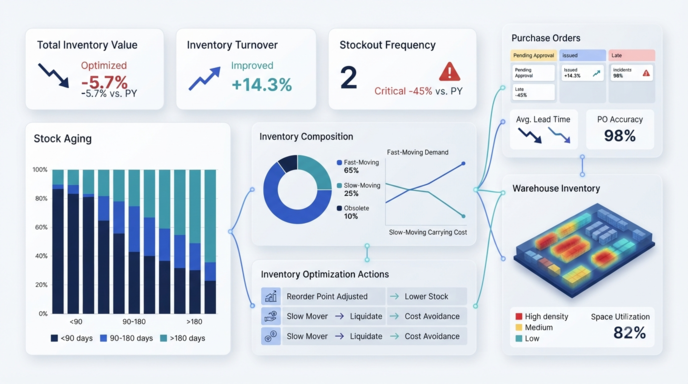
Useful Inventory KPIs Can Include:
- Inventory value.
- Inventory turnover.
- Stock aging.
- Slow-moving inventory.
- Fast-moving inventory.
- Stockout frequency.
- Purchase order status.
- Inventory by warehouse and location.
How to Reduce Inventory Costs With ERP: Implementation Steps
ERP software can provide strong inventory management capabilities, but implementation should begin with an understanding of the organization's existing processes.
Businesses should identify where inventory costs are increasing and then configure the ERP system around actual operational requirements.
Analyze Current Inventory Processes
Document purchasing, receiving, storage, transfers, production consumption, sales and inventory adjustments.
Identify Inventory Problems
Identify excess inventory, stockouts, inaccurate records, slow-moving products and inefficient purchasing processes.
Configure Inventory Workflows
Configure purchasing, warehouse, sales and inventory workflows according to the organization's actual processes.
Clean Inventory Data
Review item masters, units of measure, warehouse information, suppliers and opening inventory before migration.
Train Users
Train purchasing, warehouse, production, sales and finance teams on the processes they will use in the ERP.
Monitor Inventory KPIs
Continue monitoring inventory value, turnover, aging, stockouts and excess inventory after implementation.
Inventory Cost Reduction Checklist
Conclusion
ERP software helps businesses achieve this balance by connecting inventory with purchasing, sales, production, warehouse operations and finance.
With better demand forecasting, purchasing control, warehouse visibility, inventory reporting and stock analysis, businesses can reduce unnecessary inventory costs while maintaining the stock required to support operations.
For growing businesses, an ERP system can therefore provide a stronger foundation for inventory optimization, better operational visibility and sustainable business growth.