ERP e-invoicing integration
Learn how ERP e-invoicing integration connects invoice creation, GST data, IRN generation, QR-code responses, e-Way Bill workflows, accounting and reporting into a more controlled digital process.
What's Inside
- 01 What Is ERP E-Invoicing Integration?
- 02 Why Integrate E-Invoicing With an ERP?
- 03 How ERP E-Invoicing Integration Works
- 04 Invoice Data and GST Validation
- 05 IRN Generation, QR Code and Status Updates
- 06 E-Way Bill and Logistics Workflows
- 07 8 Benefits of ERP E-Invoicing Integration
- 08 ERP and Microsoft Dynamics 365 Business Central
- 09 Implementation Checklist
- 10 Common Integration Mistakes
- 11 Conclusion
- 12 Frequently Asked Questions
For businesses operating under India's GST framework, invoicing is more than creating a PDF or printing a document. Invoice data may need to move from the ERP or billing system through an approved e-invoicing integration path so that the relevant details can be registered and the response can be captured back into the business process.
This is where ERP e-invoicing integration becomes important. Instead of making finance teams re-enter invoice information into a government-facing portal or separate application, an integrated process can connect invoice creation, validation, registration, response handling, accounting and downstream workflows.
The exact architecture depends on the ERP, transaction volume, taxpayer setup, integration provider and the applicable GST requirements. The official IRP documentation describes API-based operations such as authentication, IRN generation, IRN cancellation, retrieval by IRN or document details, GSTIN lookup and related services.
What Is ERP E-Invoicing Integration?
ERP e-invoicing integration is the technical connection between an enterprise resource planning system and an e-invoice registration service used in an ERP e-invoicing integration. The ERP e-invoicing integration allows relevant invoice information to move between systems without requiring users to repeatedly copy data from one application to another.
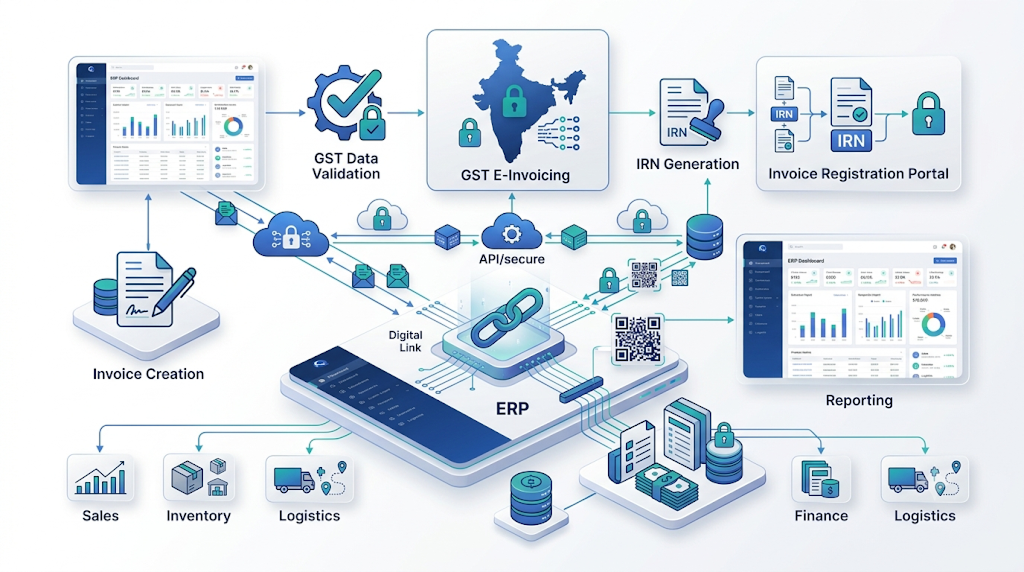
A typical process begins when an authorized user creates or posts an invoice in the ERP. The integration layer prepares the required data structure, performs validations, sends the transaction through the selected API or integration route, receives the response, and updates the ERP with registration information and other relevant details.
The Government e-invoice ecosystem supports API integration, and the IRIS IRP documentation states that direct API integration can be appropriate for taxpayers with internal IT capabilities, larger transaction volumes and a need for real-time e-invoice generation.
Why Integrate E-Invoicing With an ERP?
Without integration, an organization may have to create an invoice in its ERP, export or copy the data, submit it through another system, download the response and then update the original transaction. That creates extra steps and introduces opportunities for mismatched values, duplicate work, delayed registration and incomplete audit trails.
With ERP e-invoicing integration, the invoice can remain the source transaction while the compliance workflow is connected around it. This can improve operational consistency because the same customer, item, tax, quantity and value information used by the finance process can feed the e-invoice workflow.
- Reduce duplicate invoice data entry.
- Keep invoice and registration status visible inside the ERP workflow.
- Reduce manual movement of JSON or spreadsheet files.
- Connect e-invoice responses with accounting and document processes.
- Create a clearer operational audit trail.
- Support higher transaction volumes with repeatable processes.
How ERP E-Invoicing Integration Works
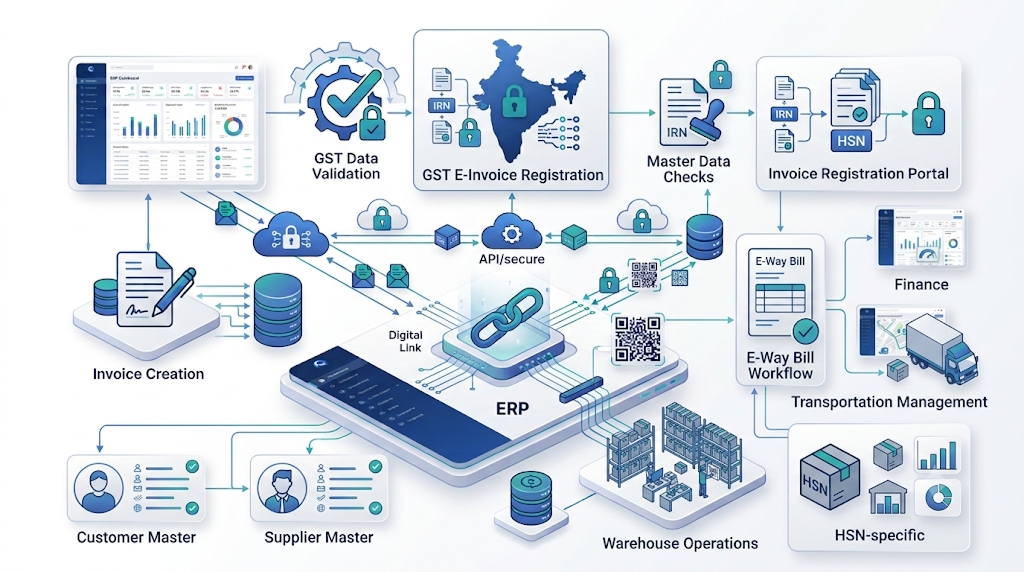
A practical ERP e-invoicing integration architecture normally contains several layers: the ERP, an integration or API layer, the IRP/e-invoice service, and the response path back into the ERP. Some organizations may use direct API integration, while others may work through a GST service provider or an ERP-specific integration solution.
Invoice Creation
The user creates or posts the invoice in the ERP using the organization's normal sales, finance or billing workflow.
Data Preparation
The integration maps ERP fields to the e-invoice data structure and applies required validations before transmission.
Registration Request
The integration authenticates and sends the prepared request through the applicable API route.
Response Handling
The response can contain registration information such as IRN and other returned invoice data, which the ERP can store against the transaction.
Downstream Processing
The registered invoice can continue through document generation, customer communication, accounting, logistics and reporting workflows.
Invoice Data and GST Validation
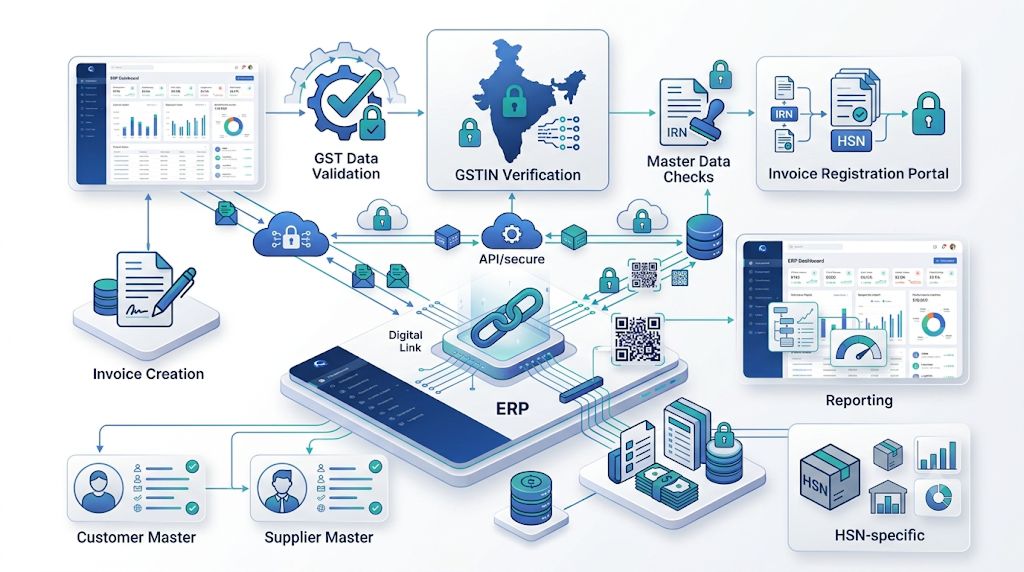
Good ERP e-invoicing integration starts with good master data. The e-invoice schema includes fields relating to the supplier, buyer, document, supply type, place of supply, item details, quantities, values and taxes. The notified schema published by the IRP identifies mandatory and optional attributes, so the ERP mapping should be designed around the current applicable specification rather than an old spreadsheet template.
Before transmission, the integration should validate the information that is most likely to cause rejection or reconciliation issues. Examples include GSTINs, document type and number, document date, HSN information, taxable values, tax amounts, place of supply and customer master data.
Master Data Matters
An integration cannot compensate for consistently poor master data. Businesses should review customer GSTINs, legal names, addresses, state codes, item classifications, units of measure and tax configuration. A structured data-cleaning exercise before go-live can reduce avoidable failures later.
IRN Generation, QR Code and Status Updates
One of the most important parts of ERP e-invoicing integration is handling the response correctly. The IRP's core API documentation lists operations for authentication, generating an IRN, cancelling an IRN, retrieving an invoice by IRN or document details, and checking related information.
The ERP should not simply send the request and forget about the response. A robust ERP e-invoicing integration design stores the returned registration information against the original transaction, records the status, handles errors clearly and provides users with a way to identify invoices that require attention.
| Integration stage | ERP responsibility | Integration responsibility |
|---|---|---|
| Invoice creation | Create accurate commercial and tax data | Read approved ERP fields |
| Validation | Maintain master and tax configuration | Apply integration/schema checks |
| Registration | Trigger or authorize submission | Authenticate and transmit request |
| Response | Store registration status | Parse and return response data |
| Exception handling | Show actionable user status | Return meaningful error details |
E-Way Bill and Logistics Workflows
For organizations moving goods, ERP e-invoicing integration may connect invoice registration with transportation and e-Way Bill processes. The IRP core API documentation includes functionality for generating an e-Way Bill by IRN and retrieving e-Way Bill details, subject to the applicable integration flow.
The business value comes from keeping logistics information connected to the original commercial transaction. When sales, finance, warehouse and logistics teams work from the same transaction, it becomes easier to trace what was invoiced, what was registered and what information was used for downstream movement. Related operational transformation examples can be reviewed in Innoverse 360's case studies.
8 Benefits of ERP E-Invoicing Integration
What a Well-Designed Integration Can Improve
Invoice information is reused instead of repeatedly entered.
Registration can become part of the normal invoice workflow.
ERP and compliance records can remain aligned.
Users can see successful, pending or failed transactions.
Registration details can be associated with the original invoice.
API-based workflows can support repeatable transaction processing.
Finance teams can report using operational invoice data.
Employees spend less time switching between systems.
ERP and Microsoft Dynamics 365 Business Central
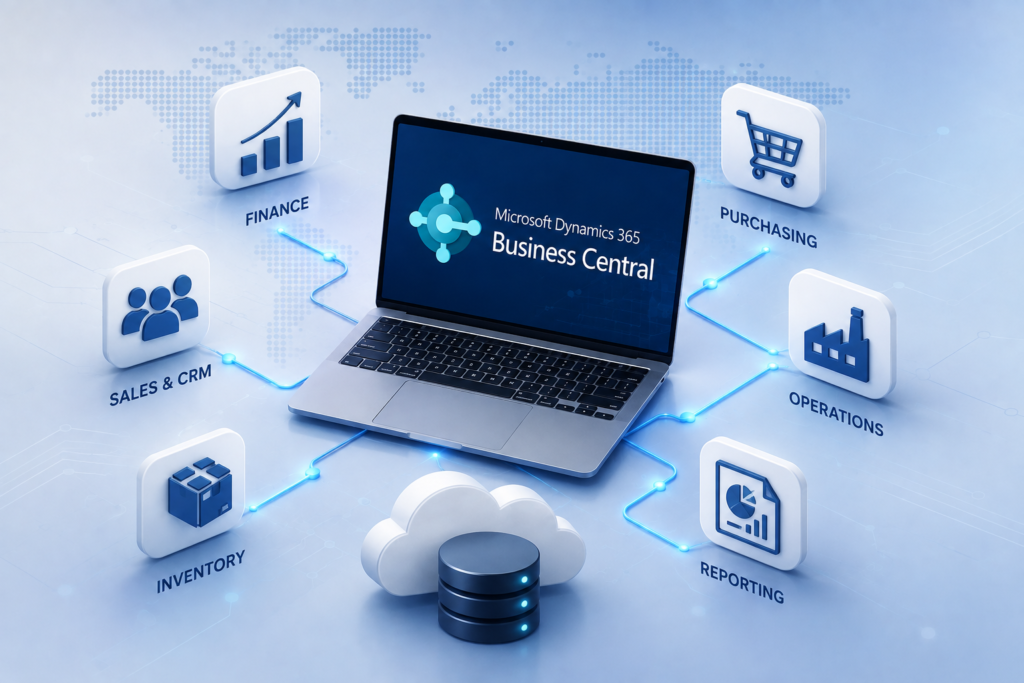
For businesses using Microsoft Dynamics 365 products, e-invoicing capabilities depend on the specific application, localization, release and integration design. Microsoft documents electronic invoicing for India in Dynamics 365 Finance, including setup through Electronic Reporting configurations and alternative file integration with GST service providers.
This is important when planning ERP e-invoicing integration: do not assume that every Microsoft ERP product, version or localization follows the same technical setup. The implementation team should first identify the exact ERP product, India localization, invoice flow and required government-facing integration path.
For businesses evaluating Microsoft Dynamics 365 Business Central, the integration design should be assessed alongside finance, sales, inventory, purchasing, tax configuration and reporting requirements. The objective is to build compliance into the wider ERP architecture rather than creating a separate invoice process. You can also explore Innoverse 360's Microsoft Dynamics 365 and ERP practice for implementation context.
ERP E-Invoicing Integration Implementation Checklist
A reliable e-invoicing integration project starts with process mapping and technical discovery. Before development begins, document how invoices are created, approved, posted, cancelled, corrected and communicated to customers.
Map the Current Invoice Process
Identify invoice sources, document types, approval points, tax rules, users and downstream systems.
Confirm Applicability and Requirements
Work with finance and tax stakeholders to confirm the organization's applicable e-invoicing obligations and operating model.
Design the Data Mapping
Map ERP fields to the current e-invoice schema and define mandatory, conditional and optional data requirements.
Choose the Integration Route
Evaluate direct API integration, a GST service provider, or an ERP-compatible integration platform based on volume, skills and support needs.
Test Positive and Negative Scenarios
Test valid invoices, validation failures, authentication issues, duplicate requests, cancellations, response handling and retry behavior.
Train Finance and Operations Users
Users should know how to create invoices correctly, interpret integration status and resolve exceptions.
Use the Official API Documentation as a Technical Reference
The IRP documentation provides current API categories and operation references. Its core APIs include authentication, IRN generation, cancellation, retrieval and GSTIN-related services, while onboarding and data APIs support other integration scenarios.
For technical teams, the IRP API integration documentation, notified e-invoice schema and core API reference should be reviewed before finalizing the integration design.
Common e-invoicing integration Mistakes
- Building against an outdated schema: specifications and portal behavior can change, so implementation teams should use current official documentation.
- Ignoring master data: incorrect GSTINs, addresses, HSN information or tax configuration can create preventable failures.
- Not storing responses: an integration should preserve important registration and status information against the source transaction.
- Weak retry logic: transient failures should be handled without creating accidental duplicate submissions.
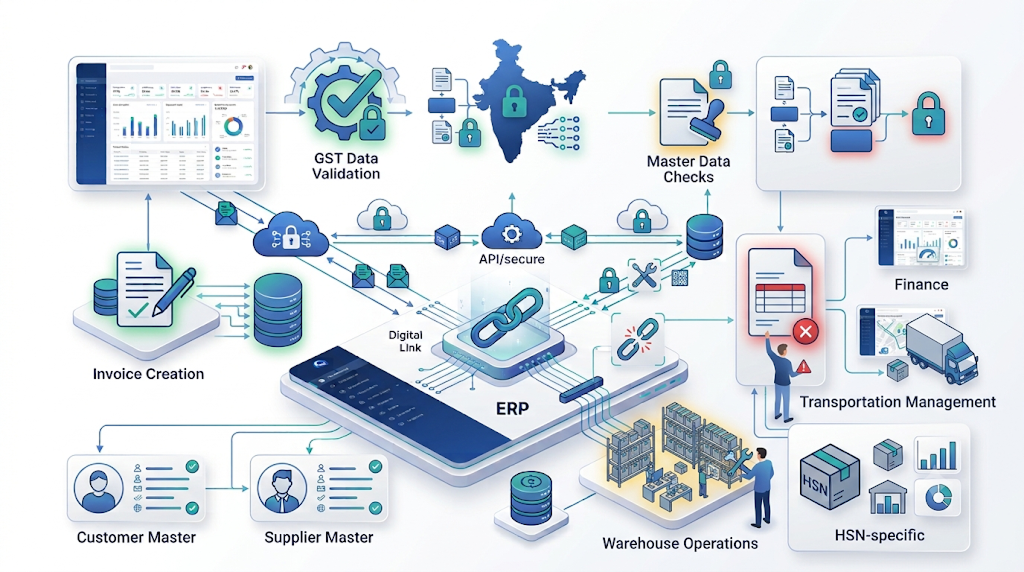
- No exception dashboard: finance teams need a practical way to find failed or pending transactions.
- Testing only the happy path: cancellations, rejected requests, authentication issues and invalid data should also be tested.
- Separating compliance from operations: e-invoicing should connect with finance, sales, warehouse and logistics processes where appropriate.
Security, Access and Operational Controls
Because e-invoice integrations exchange business and tax information, security should be part of the architecture from the beginning. API credentials should be protected, access should follow least-privilege principles, and production credentials should be separated from sandbox credentials.
The IRIS IRP documentation describes separate sandbox and production credentials for API integrators and notes encryption/decryption requirements for core e-invoice API payloads and responses.
Operational monitoring is equally important. Teams should be able to identify authentication failures, validation errors, service availability problems, rejected transactions and invoices that have not received the expected response.
How Innoverse Can Help With e-invoicing integration
Innoverse 360 works across ERP, GST compliance and digital transformation requirements for Indian businesses. Its current website describes an Innoverse E-Invoicing solution with automated e-invoice generation and IRN registration, e-Way Bill management, direct NIC/IRP portal integration, GST reconciliation and compatibility with major ERP platforms.
If your organization is evaluating an integration, start with the business process rather than the API alone. The right architecture should fit your ERP, invoice volume, tax configuration, approval model, logistics workflow, reporting needs and support structure. Businesses can also review Innoverse 360's ERP solutions when planning a broader finance and operations transformation.
You can explore Innoverse 360's ERP and digital transformation solutions, review the case studies, or browse the Innoverse 360 blog for related ERP topics.
Conclusion
e-invoicing integration can turn e-invoicing from a separate compliance activity into a connected part of the invoice lifecycle. The key is not simply sending invoice data to an API. A production-ready solution must also handle data mapping, validation, authentication, response storage, exception management, security, testing and downstream business workflows.
For Indian businesses, the implementation should be based on current official GST/IRP requirements and the exact ERP environment in use. When finance, tax, IT, sales and logistics teams are involved early, the resulting architecture is more likely to be practical, supportable and scalable. For related ERP guidance, visit the Innoverse 360 blog.